
LCP and SEO: How Largest Contentful Paint Affects Search Performance
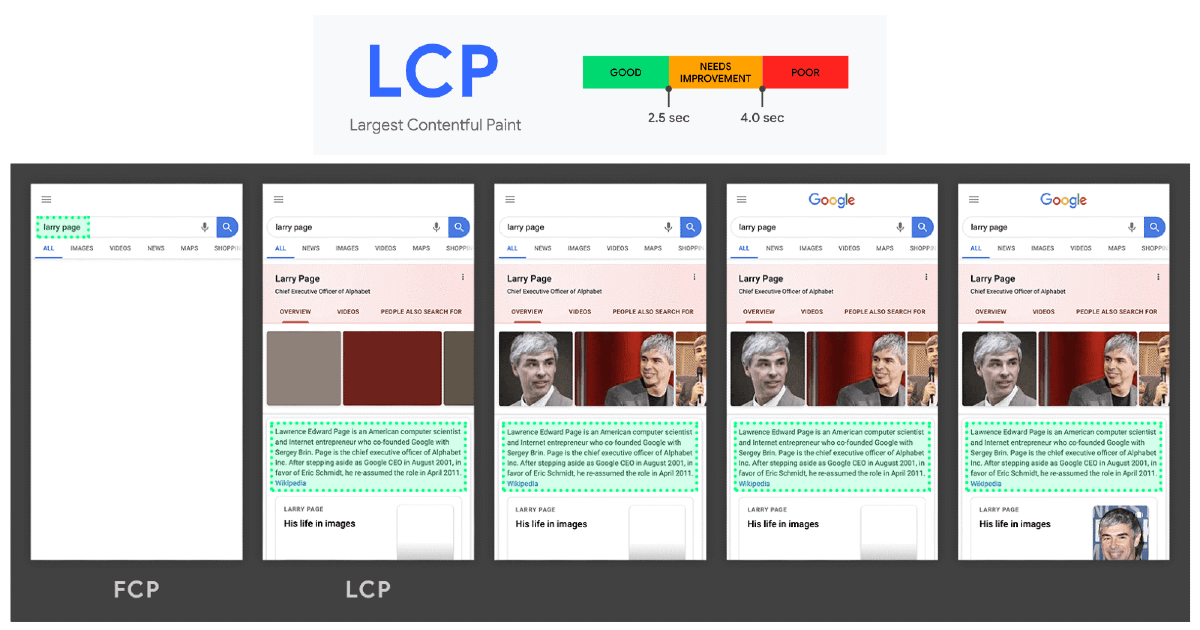
Page speed influences how people experience a website—and that experience can affect how well a site performs in search. One important speed metric is Largest Contentful Paint, or LCP. It measures how long it takes for the largest visible piece of content in the viewport to appear.
Understanding LCP can help you find loading problems, improve usability, and support your broader SEO efforts. It is not a shortcut to higher rankings, but it is a useful part of building a fast, reliable website.
What Is Largest Contentful Paint?
LCP is a Core Web Vital that tracks perceived loading speed. Rather than measuring when every part of a page has finished loading, it focuses on when the main content a visitor can see is rendered.
The LCP element may be an image, a video poster image, or a large block of text. Common examples include a hero image, a prominent headline, or a large banner near the top of a page. The element can vary depending on the page layout and the visitor’s screen.
What Is a Good LCP Score?
Google’s recommended LCP thresholds are:
- Good: 2.5 seconds or less
- Needs improvement: More than 2.5 seconds and up to 4 seconds
- Poor: More than 4 seconds
These thresholds are evaluated at the 75th percentile of real user visits. In practical terms, a page should load within the “good” range for at least 75% of visits. Mobile and desktop results are assessed separately, so a page may perform well on one and poorly on the other.
How Does LCP Affect SEO?
LCP is one of Google’s Core Web Vitals, which are included in its page experience signals. A strong LCP can contribute to a smoother experience, while a slow LCP may frustrate visitors who are waiting for the main content to appear.
However, LCP is not a standalone ranking guarantee. Search rankings depend on many factors, including relevance, content quality, and how well a page meets a searcher’s needs. Improving LCP can support SEO, but it does not replace useful content or a sound technical SEO strategy.
There is also a practical benefit: pages that display their main content quickly may be easier and more pleasant to use. That can help visitors engage with your site, especially on mobile devices or slower connections.
Common Causes of a Slow LCP
A slow LCP often comes from one or more of these issues:
- Slow server response: The browser takes too long to receive the initial page response.
- Large, unoptimized images: Oversized hero images can take a long time to download and render.
- Render-blocking resources: CSS or JavaScript may delay the display of important content.
- Too much JavaScript: Heavy scripts can keep the browser busy before it paints the main content.
- Web fonts that load slowly: Text may be delayed or briefly hidden while fonts download.
- Third-party scripts: Advertising, analytics, chat tools, and other services can add loading delays.
- Client-side rendering: If key content depends on JavaScript, visitors may have to wait for scripts to run before seeing it.
How to Improve LCP
Find the LCP Element
Start by identifying which element is being measured. It might be a hero image on one page and a headline on another. Improving the wrong element may not meaningfully change the score.
Improve Server Response Time
Choose reliable hosting and look for server-side delays. Caching, a content delivery network (CDN), and improvements to database or application performance can help deliver page content sooner.
Optimize Important Images
Compress images and serve them at appropriate dimensions. Modern formats such as WebP or AVIF can reduce file sizes while preserving visual quality. For the main image near the top of the page, avoid lazy-loading it; lazy-loading can postpone an image that should appear as soon as possible. Images farther down the page can often be lazy-loaded.
Prioritize Critical Resources
Make sure the browser can discover and download the LCP resource early. For example, an important image should not be hidden behind a long chain of scripts or loaded only after a user interaction. Preloading can help in specific cases, but it should be used selectively.
Reduce Render-Blocking CSS and JavaScript
Remove unused code, minimize unnecessary scripts, and defer nonessential JavaScript. Keep the CSS needed to display the content at the top of the page available promptly. Avoid delaying the main content with animations, large widgets, or unnecessary effects.
Make Text Render Quickly
If text is the LCP element, review how web fonts load. Use efficient font files, limit the number of font weights, and configure font display behavior so visitors are not left waiting for text to appear.
Review Third-Party Tools
Check whether every third-party script is necessary. Remove tools that no longer serve a clear purpose, and load nonessential scripts later when appropriate. A single external service can sometimes slow down the visible page.
How to Measure LCP
Use both field data and lab testing to understand performance:
- Google Search Console: The Core Web Vitals report can show groups of pages with issues based on real-world data.
- PageSpeed Insights: Provides field data when available, along with lab diagnostics and improvement suggestions.
- Chrome User Experience Report: Offers aggregated real-user performance data for eligible pages and sites.
- Chrome DevTools or Lighthouse: Useful for diagnosing performance in a controlled test environment.
Lab results help you investigate specific problems, but field data shows what visitors experience across different devices, networks, and locations. Use both when possible, and recheck performance after making changes.
Make LCP Part of Your SEO Process
For an effective LCP improvement plan, begin with pages that matter most to your business, such as key landing pages, product pages, and high-traffic articles. Identify the LCP element, diagnose what is delaying it, and prioritize fixes that improve real user experience.
Fast loading is only one part of a successful SEO strategy. Pair good LCP performance with helpful content, clear site structure, accessible design, and a strong technical foundation. Together, these elements create a better experience for visitors and support your site’s long-term search visibility.
5 Benefits of LCP SEO for Enhancing Website Performance and User Experience
- Improves perceived page speed.
- Supports a better user experience.
- Helps identify slow-loading content.
- Can strengthen Core Web Vitals performance.
- Complements a well-rounded SEO strategy.
5 Challenges of Optimizing LCP for SEO Success
- LCP improvements do not guarantee higher rankings.
- Performance testing and monitoring take time.
- Some fixes require developer support.
- Third-party scripts can remain difficult to control.
- Lab scores may not reflect every visitor’s experience.
Improves perceived page speed.
Improving Largest Contentful Paint (LCP) helps your website feel faster by showing visitors the page’s main content sooner. Even if some elements are still loading in the background, people can begin reading or interacting without waiting for the entire page to finish. This quicker sense of responsiveness can make the experience more satisfying, especially for mobile users and people on slower connections.
Supports a better user experience.
A fast Largest Contentful Paint (LCP) supports a better user experience by showing visitors the main content quickly. When a page’s headline, hero image, or other prominent content appears without a long wait, people can understand what the page offers and start using it sooner. This can make a site feel more responsive and reliable, especially for visitors on mobile devices or slower connections.
Helps identify slow-loading content.
One key benefit of LCP SEO is that it helps identify slow-loading content that may frustrate visitors. By measuring how quickly the largest visible element—such as a hero image, headline, or banner—appears, LCP points to pages that may need performance improvements. This makes it easier to focus on issues like oversized images, slow server responses, or scripts that delay important content, creating a faster and more enjoyable experience for users.
Can strengthen Core Web Vitals performance.
Improving Largest Contentful Paint (LCP) can strengthen your site’s Core Web Vitals performance by helping the main content load faster for visitors. A good LCP contributes to a smoother page experience, particularly on mobile devices and slower connections. While it does not guarantee higher search rankings, optimizing LCP supports technical SEO and makes important pages more responsive and pleasant to use.
Complements a well-rounded SEO strategy.
Improving Largest Contentful Paint (LCP) can complement a well-rounded SEO strategy by making important page content appear faster and improving the experience for visitors. While LCP alone won’t guarantee better rankings, it works alongside useful content, relevant keywords, sound site structure, and other technical SEO practices to help create a website that serves both users and search engines.
LCP improvements do not guarantee higher rankings.
Improving Largest Contentful Paint (LCP) can make a website feel faster and easier to use, but it does not guarantee higher search rankings. Google considers many signals, including content relevance, quality, and how well a page meets searchers’ needs. LCP is just one part of page experience, so even a faster page may not rank better if other SEO factors are weak or competing pages provide more useful answers.
Performance testing and monitoring take time.
A drawback of focusing on LCP for SEO is that performance testing and monitoring take time. Teams need to regularly check real-user data, test pages across devices and connection speeds, identify what is slowing the largest visible element, and verify that fixes actually work. Because page content, code, and third-party tools change over time, LCP improvements may also require ongoing attention rather than a one-time adjustment.
Some fixes require developer support.
Some LCP improvements require developer support, especially when they involve changing server settings, optimizing how a site loads CSS and JavaScript, or modifying its theme or code. If you don’t have in-house technical help, these fixes may take extra time or add costs. A developer can help identify the safest changes and avoid breaking important features while improving page speed.
Third-party scripts can remain difficult to control.
One challenge with improving LCP for SEO is that third-party scripts can be difficult to control. Tools for analytics, advertising, chat, or embedded content may load slowly, change without notice, or add work for the browser before the main content appears. Because these scripts are managed by outside providers, you may have limited control over their performance or timing. Regularly review which tools are essential, and consider delaying or removing nonessential scripts to help your page load faster.
Lab scores may not reflect every visitor’s experience.
Lab scores for LCP are collected under controlled testing conditions, so they may not match what every visitor experiences in the real world. Actual loading times can vary based on a person’s device, internet connection, location, browser, and other factors. Use lab results to diagnose potential issues, but compare them with real-user data to get a fuller picture of your site’s performance.