
CLS and SEO: How Cumulative Layout Shift Affects Your Website
A page can load quickly and still feel frustrating if its content jumps around while a visitor is trying to read or interact with it. That visual instability is measured by Cumulative Layout Shift, or CLS. It is one of Google’s Core Web Vitals and an important part of creating a smooth, reliable experience for website visitors.
CLS can also matter for SEO. While it is not a substitute for useful content or strong relevance, it is a user-experience signal that site owners should monitor as part of their technical SEO work.
What Is CLS?
Cumulative Layout Shift measures unexpected movement of visible page elements. For example, a visitor may be about to tap a button when an advertisement loads above it and pushes the button down the page. That movement is a layout shift.
CLS is a score, not a time measurement. It reflects how much of the visible screen changes and how far affected elements move. The score is calculated from unexpected shifts during a page visit. Shifts closely following a user’s interaction, such as a tap or keypress, are generally excluded from the calculation.
What Is a Good CLS Score?
Google’s CLS guidance uses these ranges:
- Good: 0.1 or less
- Needs improvement: Greater than 0.1 and up to 0.25
- Poor: Greater than 0.25
These thresholds are assessed at the 75th percentile of page visits, with mobile and desktop results considered separately. In other words, the score should be good for most visitors—not just during a single test on a developer’s computer.
Why CLS Matters for SEO
Google uses Core Web Vitals as part of its page experience evaluation. A poor CLS score can indicate that a page is difficult to use, particularly on mobile devices where the screen is smaller and sudden movement can make links or buttons harder to select.
That does not mean improving CLS automatically leads to higher rankings. Search rankings depend on many factors, including how helpful and relevant a page is. Core Web Vitals are one part of the broader picture, so CLS improvements should support—not replace—quality content, sound site structure, and other SEO fundamentals.
There is also a practical benefit: a stable page can make it easier for visitors to read, browse, and complete tasks. Better usability may support engagement and conversions, even when the effect on rankings is difficult to isolate.
Common Causes of Layout Shift
- Images without set dimensions: The browser may not reserve space before an image loads.
- Ads and embedded content: Advertisements, videos, maps, or social media embeds may appear after the surrounding page has rendered.
- Web fonts: A text style can change when a custom font loads, causing words to wrap differently.
- Content inserted above existing content: Banners, notices, or promotional sections can push visible content down.
- Dynamic page elements: Widgets or components that load or resize after the initial render can move other elements.
How to Improve CLS
Reserve Space for Images and Video
Specify width and height for images and video, or use CSS aspect ratios. This lets the browser allocate the correct space before the media finishes loading.
Plan for Ads and Embeds
Set aside appropriately sized containers for advertisements and embedded content. If the final size can vary, reserve a reasonable minimum space to reduce the chance of pushing other content around.
Handle Fonts Carefully
Choose font-loading settings and fallback fonts that minimize changes in text dimensions. Preloading a critical font may help in some cases, but it should be done selectively and tested across devices.
Avoid Inserting Content Above the Page
Where possible, show new banners or notices in a way that does not displace content a visitor is already viewing. If an element must take up space, include that space in the initial layout.
Test Real Pages and Devices
Check important templates—such as product pages, articles, and landing pages—on both mobile and desktop. A fix for one page may not address a layout shift caused by a shared header, ad slot, or site-wide widget.
How to Measure CLS
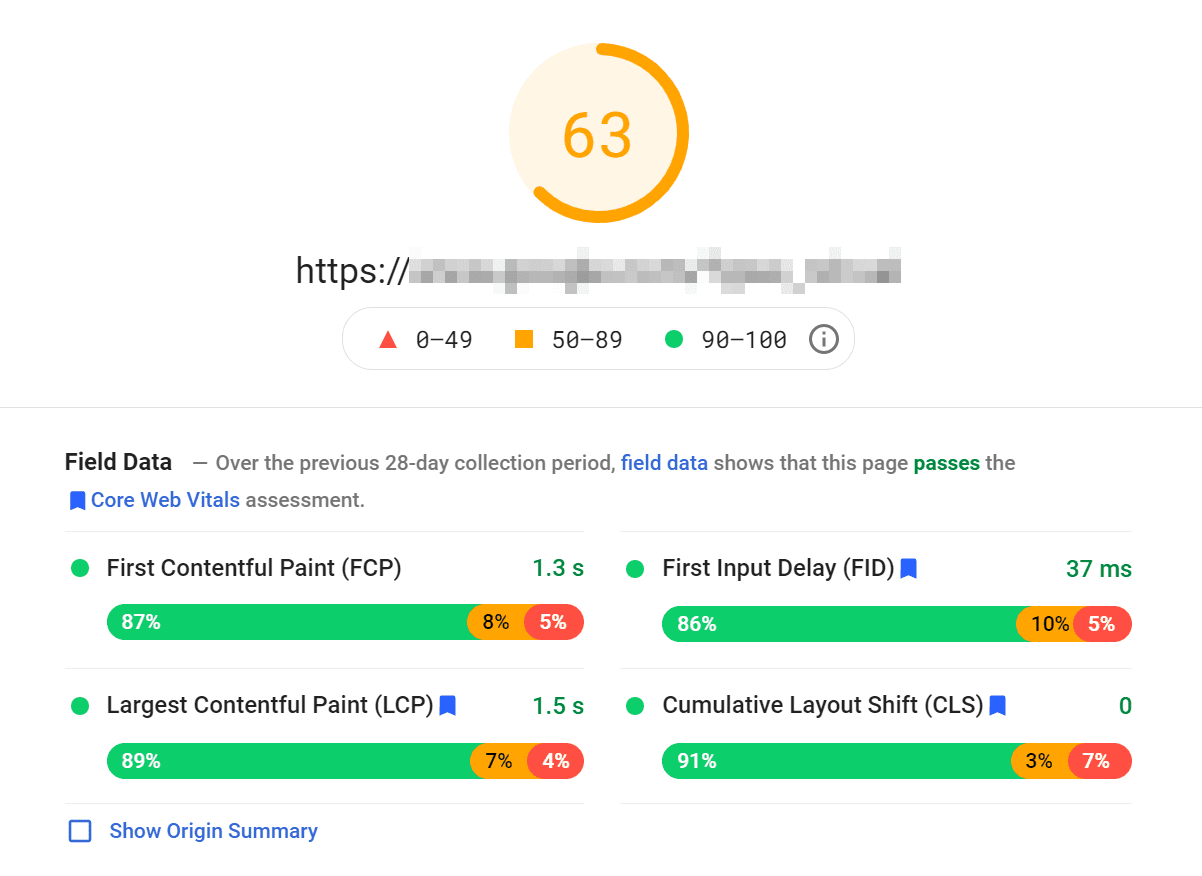
Use both lab tools and field data. Lab tests, such as Lighthouse, help reproduce issues under controlled conditions. Field data reflects how real visitors experience the page and can reveal problems that do not appear in a single test.
Useful resources include Google Search Console’s Core Web Vitals report, PageSpeed Insights, Chrome DevTools, and the web-vitals JavaScript library. When investigating a poor score, identify the element that moved and the element or event that caused it. Then test the change on the affected page templates and review the results again.
CLS SEO: The Bottom Line
CLS SEO refers to improving Cumulative Layout Shift as part of technical SEO and website performance work. A good CLS score helps create a more stable experience and contributes to a stronger Core Web Vitals profile. Start by reserving space for media and dynamic content, managing font changes, and checking real-user data. The goal is not only a better score, but a page that behaves as visitors expect.
CLS and SEO: 5 Frequently Asked Questions About Rankings, Scores, and Optimization
- What is CLS in SEO?
- How does CLS affect SEO rankings?
- What is a good CLS score?
- How can I improve CLS on my website?
- How do I measure and monitor CLS?
What is CLS in SEO?
CLS, or Cumulative Layout Shift, is a Core Web Vital that measures how much a webpage’s visible content unexpectedly moves as it loads. In SEO, CLS matters because sudden shifts can make a page frustrating to use—for example, when a button moves just as someone tries to tap it. A good CLS score is 0.1 or lower. Improving CLS supports a smoother user experience and can contribute to overall page experience, though it does not guarantee higher search rankings.
How does CLS affect SEO rankings?
CLS can affect SEO as part of Google’s Core Web Vitals and broader page experience evaluation, but it is only one of many ranking considerations. A poor CLS score may signal a frustrating experience when page content shifts unexpectedly, while a stable layout can make a site easier to use. Improving CLS alone does not guarantee higher rankings, so pair performance work with helpful content, relevant information, and solid technical SEO.
What is a good CLS score?
A good Cumulative Layout Shift (CLS) score is 0.1 or lower, according to Google’s Core Web Vitals guidance. Scores above 0.1 and up to 0.25 need improvement, while scores greater than 0.25 are considered poor. CLS measures unexpected movement of page content, so a lower score means visitors are less likely to lose their place or accidentally click the wrong item. Google evaluates CLS using real-user data, typically at the 75th percentile, with mobile and desktop results assessed separately.
How can I improve CLS on my website?
To improve CLS (Cumulative Layout Shift) on your website, prevent page elements from moving unexpectedly as content loads. Set width and height attributes or aspect ratios for images and videos, reserve space for ads and embeds, and avoid inserting banners or other content above material visitors are already viewing. You can also optimize font loading to reduce text shifts. Use tools such as PageSpeed Insights, Lighthouse, and Google Search Console’s Core Web Vitals report to identify affected pages, then test changes on both mobile and desktop.
How do I measure and monitor CLS?
To measure and monitor CLS, use Google Search Console’s Core Web Vitals report and PageSpeed Insights to review real-user data, then use Lighthouse or Chrome DevTools to investigate specific pages in a controlled test. Check mobile and desktop results separately, since layout shifts can differ by device. Monitor key page templates over time, especially after design, ad, font, or content changes, and look for a CLS score of 0.1 or less at the 75th percentile.